Inizia gratis
Questa pagina non è ancora tradotta: stai leggendo la versione inglese.
Import

Import the register you already have.

No template to copy, no columns to rename. Drop in your Excel or CSV file as it is, and Dueclear works out what is what. Then it shows you exactly what it found before anything is saved.

dueclear.app
Matching columns
What happens to your file

Eight checks in a couple of seconds.

Dueclear reads your file in your browser and goes through the same steps every time, so the result is predictable.

  1. Step 1
    Reads the file where it is

    In the demo your file never leaves your computer. It is read in the browser and nothing is uploaded.

  2. Step 2
    Finds the real header row

    Registers often start with a title, an export date or a blank line. Dueclear scores the first rows and picks the one that looks like headers, then tells you how many rows it skipped above it.

  3. Step 3
    Detects the separator

    Comma, semicolon, tab or pipe. Excel in Italy, Germany, Spain and Portugal saves CSV files with semicolons, and Dueclear handles both.

  4. Step 4
    Matches columns by name

    Column names are recognised in five languages: Scadenza, Ablaufdatum, Vencimiento, Validade and Expiry all become the expiry date.

  5. Step 5
    Matches columns by content

    If a header means nothing, such as Col4, Dueclear looks at the values. Dates in the future suggest an expiry, two-word names suggest people, and words like inspection or extinguisher suggest the item.

  6. Step 6
    Reads dates in your format

    It looks for proof of the format. A value like 14/03/2027 can only be day first. If nothing proves it either way, it uses your region's format and says so.

  7. Step 7
    Checks every row

    Each row is marked ready, to check or needs a date. You can fix a date directly in the table.

  8. Step 8
    Imports, and says what it skipped

    The button tells you how many items will be imported, and a note tells you how many rows will be left out and why.
Match columns

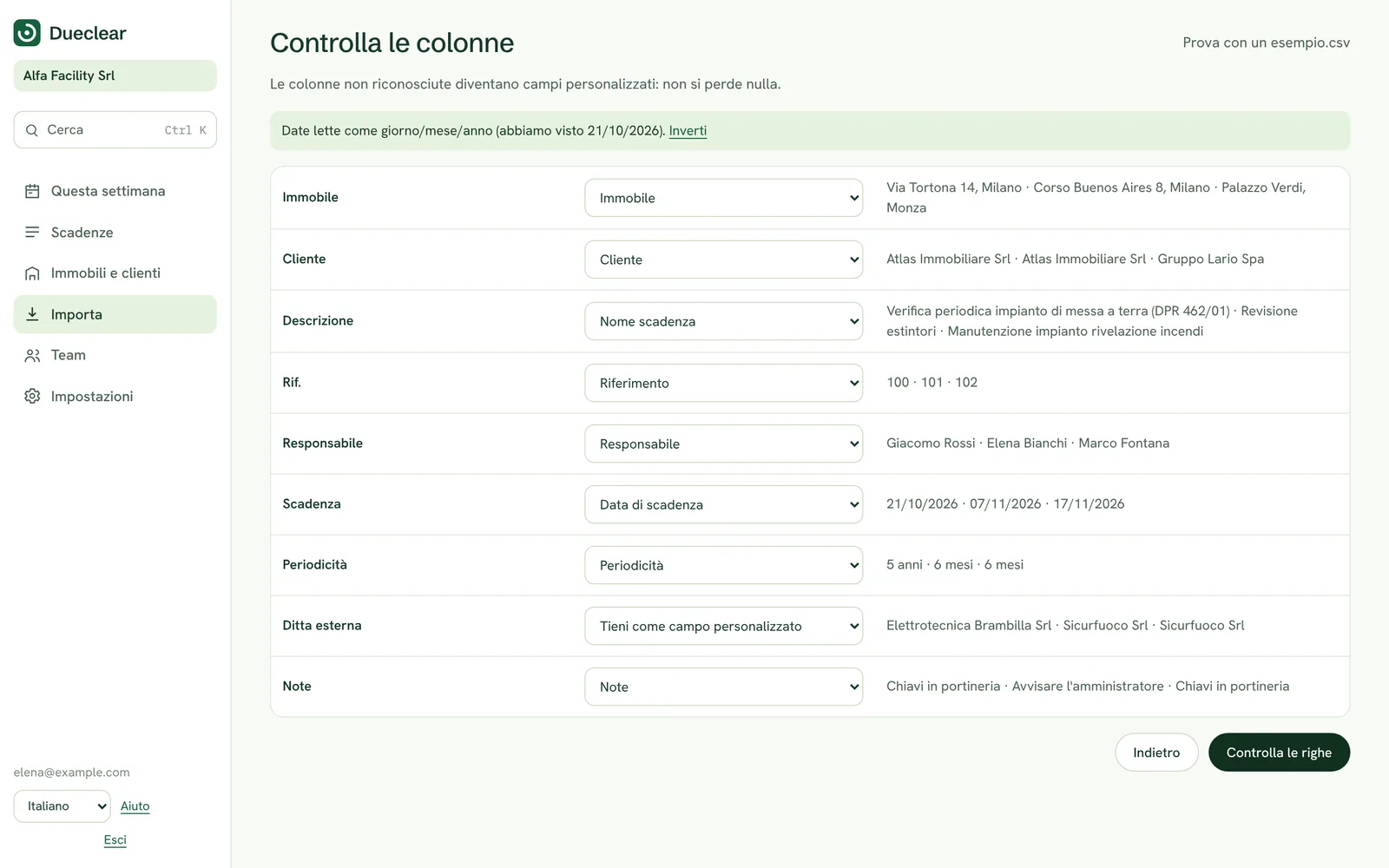
See every match before you continue.

Each column in your file appears with example values and what it will import as. Matched columns are marked, guesses are marked as guesses, and anything unrecognised becomes a custom field so nothing is lost.

Change any match with one click. If there is no expiry column at all, Dueclear stops and asks, because renewal dates are the whole point.

  • Matched, guessed or new field, always labelled
  • Extra columns kept as custom fields
  • Blocks the import if no expiry date is mapped
dueclear.app
Match columns
Check rows

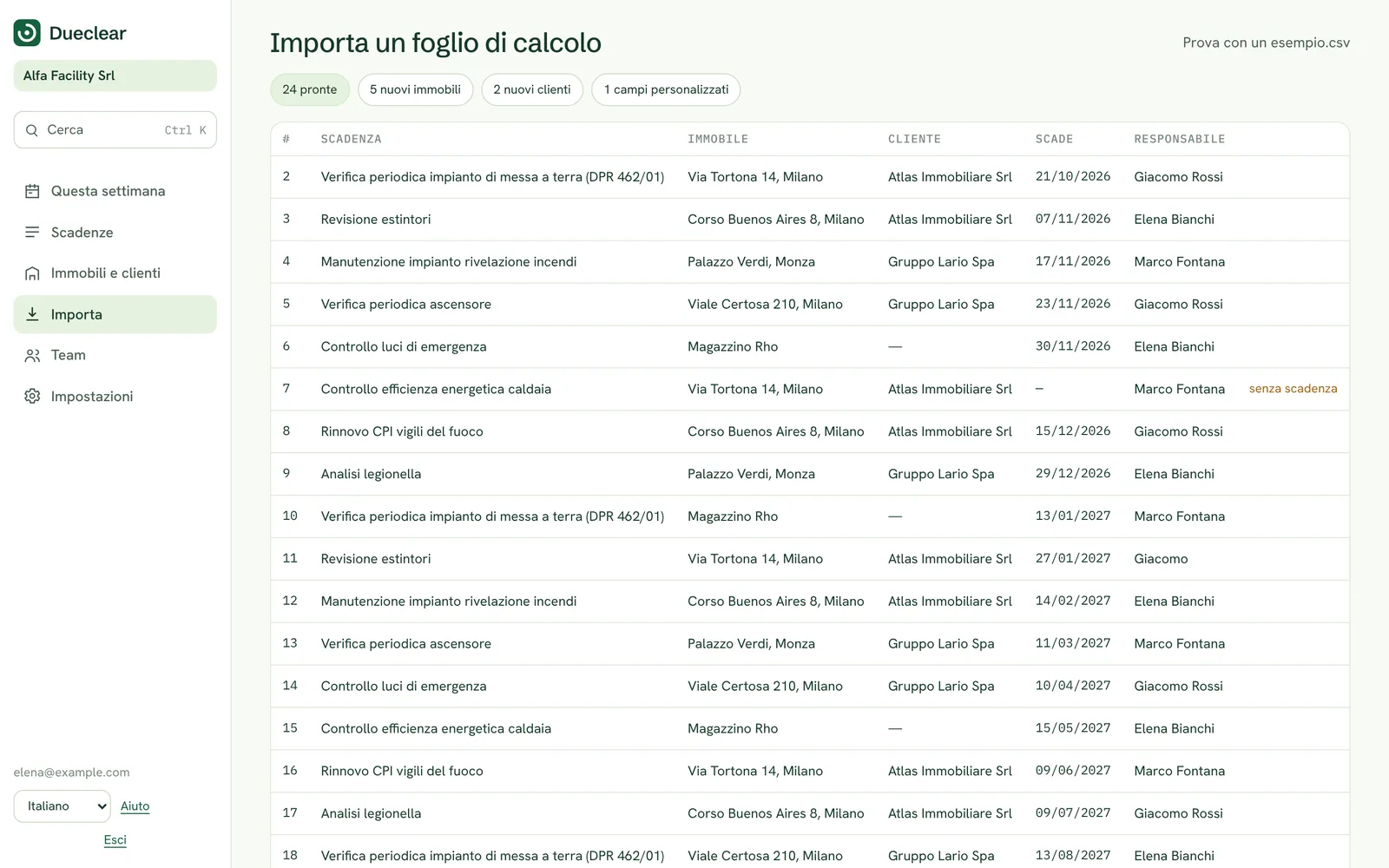
Fix problems before they become records.

The preview lists every row with its item, building, owner and expiry. Impossible dates such as 31 February are flagged, missing dates get an input box, and dates in an unusual format are marked for a quick check.

When you import, the result tells you how many items went to how many sites.

  • Ready, to check and needs a date
  • Fix dates inline
  • Duplicates spotted
dueclear.app
Check rows
Tested on messy files

Built for the spreadsheets people actually keep.

We tested the import with the kind of files that break most tools. Here is what Dueclear does with each.

Title rows above the headers

Skips them, finds the real header row and tells you how many rows it skipped.

Semicolon CSV files

Detects the separator from the whole file, not just the first line.

Headers in another language

Recognises column names in Italian, German, Spanish, Portuguese and English.

No useful headers at all

Recognises the item, building, owner and expiry from the values in each column.

Impossible dates

Flags 31/02 or month 13 as unreadable instead of guessing a wrong date.

A last-done column

Prefers future dates for the expiry, so a column of past dates is not mistaken for it.

Accents and quoted commas

Keeps names such as Königstraße and values such as "Depot, Unit 4" intact.

Excel files

Reads .xlsx and .xls files, including title rows above the headers.

Formats

What Dueclear reads.

Supported
FilesExcel (.xlsx, .xls) and CSV. The first worksheet is imported.
SeparatorsComma, semicolon, tab and pipe, detected automatically.
Dates14/03/2027, 03/14/2027, 2027-03-14, 14.03.2027 and 14-03-2027. Two-digit years are read as 20xx.
Intervals"12 months", "1 year", "annual", "12 mesi", "6 Monate" and similar.
ColumnsItem, site or building, owner, expiry date, interval and notes, plus any number of custom fields.

Questions about importing

Is my file uploaded?

In the demo, no. The file is read in your browser and the example data is stored only on your device. In the real product your register will be stored on secure servers in the EU.

What if a column is matched wrongly?

Choose a different field from the list next to it, keep it as a custom field, or choose not to import it.

My workbook has several sheets.

Only the first worksheet is imported. Move the register to the first sheet, or save that sheet as a CSV file.

Can I undo an import?

In the demo, use Reset demo. In the real product you will be able to undo the last import.

Inizia gratis oggi

Gratis per un edificio, con 30 giorni di prova di tutte le funzioni. Nessuna carta richiesta. Preferisci una presentazione? Prenota una demo di 20 minuti.